In this guide, I will show you how I do increase my cloudmining for FREE on EOBOT. And how I increase my cryptocurrency with that mining power. I use a lot of free mining faucet's from different sites (i made some links below) that will provide with some free crypto-currency. The amount each time is small, but there are a lot of sites and you can claim multiple times a hour. In total daily>/weekly it will add up.
I use all my free income to boost my cloud-mining at EOBOT, so i'll gain more mining-power what will provide me with more mining-power and so forth. First, for people who don't know what is EOBOT? EOBOT is a cloud mining service running since 2013. The majority of reviews about this service are quite good and the service seems totally legit.
Now, when I started on EOBOT, I didn't know how to use it. The user interface is a little bit misleading when you are a totally beginner in cryptocurrencies. You don't know what to do, and what is the real purpose of EOBOT. Actually a lot of people open an account with eobot and give up on it. Because they just don't understand how to use it.
EOBOT is a platform with which you can mining cryptocurrencies and earn coins like Bitcoin, Etherum, Litecoin, Steem, Monero...
Generally you have to pay and invest some money to have the mining power (GHS) to mine those coins. But you can also start little by little for free on EOBOT and build your mining power for free with some little actions. In this guide I will show how I build little by little my GHS power with a new account on EOBOT to earn some coins.
https://www.eobot.com/
Click on signup on the rightside of the menu.
 Screenshot from my account
You will be tempted to click and mine Bitcoin because it's so popular.
But the first thing you have to do when you have a new Account is to get some mining power.
The mining power is called Cloud Mining GHS on EOBOT, it allow you to mine crypto currencies. The more you have, the faster you will mine and earn coins.
The GHS power that you own should be listed on the bottom of the list. If you have a new account it should be at 0.


The GHS item will be selected on your list.
Then go in the menu : Products > Faucet

A new screen will open with some ads, and a captcha box.
Solve the captcha by typing the words. And Click on Get Faucet Reward
A few GHS will be added to your account.
This GHS power will allow you to mine coins.
The EOBOT faucet is reset everyday, build up your GHS everyday with this method.
So the next day and the next and the next, you will receive ## Dodge coin.
On EOBOT, each coins (Dodge, Bitcoin, Etherum...) can be exchanged to GHS power.
So I'll ask you, why don't use that coin to build our GHS?
You probably understand why I suggested to mine Dodge coins at the beginning.
Mined Dodge coin added to EOBOT free dodge coin will allow us to buy more and more GHS everydays. (you need a minimum so mining dodge and your daily faucet will help with that)
To exchange your Dodge coins to GHS do first choose DODGE in the dropdown menu.
 Scroll down, verify that you have DODGE selected in the From dropdown.
Then select Cloud SHA-256, 5 year Rental and click Buy Cloud SHA-256, 5 year Rental.
Your Dodge coins will be converted to GHS power (for 5 years).
Repeat this routine everyday and you will see your GHS power grows.
To accelerate the process we can use other methods like external faucets and get FREE coins and exchange them for GHS power.
But first we have to configure the EOBOT account to receive them.
To generate your wallets, click on Deposit from your dasboard.
Scroll down and click Generate on each wallet you want (it may take some time to generate each wallet).
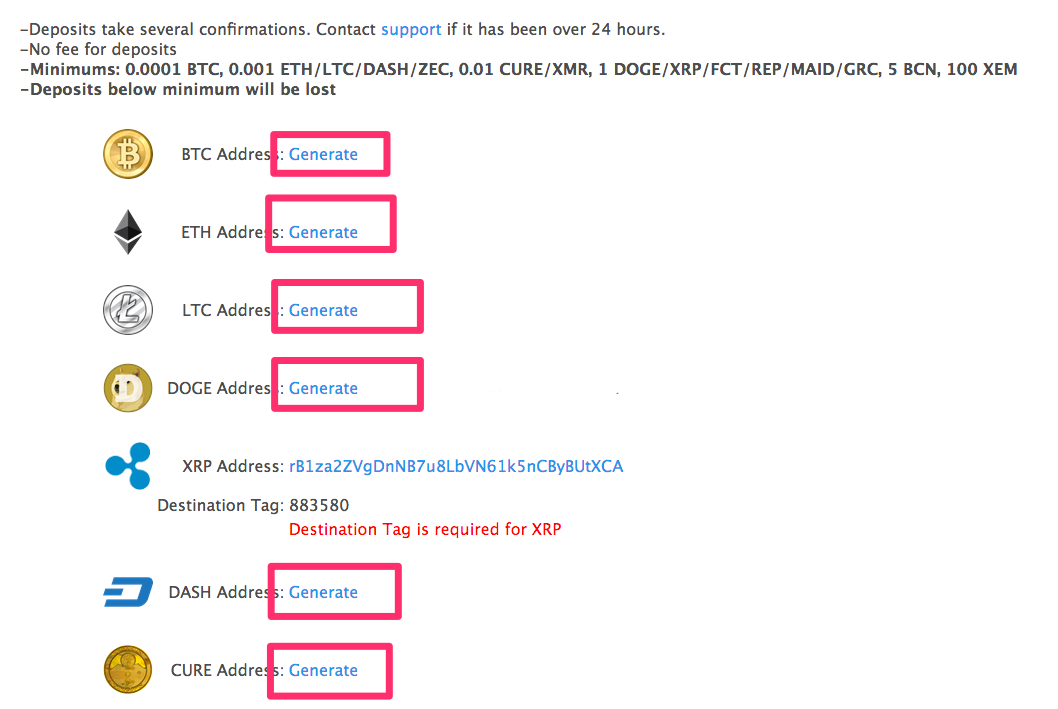
After you have all your wallet, we are going to register on several Faucet's websites that I'm using.
Fill the EOBOT dodge wallet address into your profile to receive dodge coin later.
Then go into FREE DODGE menu
Fill the captcha and click ROLL.
You will receive some dodge coins in your FreeDodge.co.in account.
This faucet is reset each hour, you can roll it every hour to get Dodge coins.
You will be able to withdraw them and transfer them to your EOBOT account, when you reach 100 Dodge coins.
Now, that you understand external faucets' website, it will be almost the same routine for each faucet's website.
In a new blog i'll dive deeper in to this very nice site.
It's a wallet, it's a CPU browser miner, it's a referal history link.
http://moonliteco.in/
http://moondash.co.in/
http://bonusbitcoin.co/
http://bitfun.co/
The different cryto-currency i make on the moon faucet's will be deposited in my coinpot account. With in coinpot ill exchange everything to dodge. And that amount i can transfer to EOBOT.
This wil increase my GHS on EOBOT alot!
https://freebitco.in/
All the faucets above concern Dodge coins, but you can also use other crypto currencies' faucets. It's works also.
Remember that we want to redirect the most free coins as possible into our EOBOT account. So why don't use them ?
Open your account via the link below and fill your EOBOT bitcoin wallet address.
You will be able to withdraw your coins when your reach 0.00030000 Bitcoin (BTC)

Instant Dodge is a faucet that allow you to claim Dodge coins every 5 minutes.
Open your account via the link below and fill your EOBOT dodge wallet address.
https://www.instant-doge.eu/
You will be able to withdraw your coins when your reach 120 Dodge coins.
With EOBOT and a lot of Faucets' website (in referral menu), you can share your link to your family and friends to get extra GHS or Coins.

For example, in this article I have shared my links (If you register via my links I will be really happy, but it's really up to you).
You can also do the same by sharing your links to your friends.
That's all for that Guide on EOBOT, I hope you enjoyed this article and hope that it will help you to get FREE GHS.
I use all my free income to boost my cloud-mining at EOBOT, so i'll gain more mining-power what will provide me with more mining-power and so forth. First, for people who don't know what is EOBOT? EOBOT is a cloud mining service running since 2013. The majority of reviews about this service are quite good and the service seems totally legit.
Now, when I started on EOBOT, I didn't know how to use it. The user interface is a little bit misleading when you are a totally beginner in cryptocurrencies. You don't know what to do, and what is the real purpose of EOBOT. Actually a lot of people open an account with eobot and give up on it. Because they just don't understand how to use it.
EOBOT is a platform with which you can mining cryptocurrencies and earn coins like Bitcoin, Etherum, Litecoin, Steem, Monero...
Generally you have to pay and invest some money to have the mining power (GHS) to mine those coins. But you can also start little by little for free on EOBOT and build your mining power for free with some little actions. In this guide I will show how I build little by little my GHS power with a new account on EOBOT to earn some coins.
1) OPEN AN ACCOUNT ON EOBOT
Click the link below to access the eobot.com websitehttps://www.eobot.com/
Click on signup on the rightside of the menu.
2) BEGINNING WITH EOBOT
When you have created your account, you will see a list of cryptocurrencies on your dashboard :
You will be tempted to click and mine Bitcoin because it's so popular.
But the first thing you have to do when you have a new Account is to get some mining power.
The mining power is called Cloud Mining GHS on EOBOT, it allow you to mine crypto currencies. The more you have, the faster you will mine and earn coins.
The GHS power that you own should be listed on the bottom of the list. If you have a new account it should be at 0.

3) HOW TO BUILD YOUR GHS
3.1) BUILD GHS WITH EOBOT FAUCET
To get some GHS, first you have to select GHS 4.0 on the dropdown menu.
The GHS item will be selected on your list.
Then go in the menu : Products > Faucet

A new screen will open with some ads, and a captcha box.
Solve the captcha by typing the words. And Click on Get Faucet Reward
A few GHS will be added to your account.
This GHS power will allow you to mine coins.
The EOBOT faucet is reset everyday, build up your GHS everyday with this method.
3.2 BUILD GHS WITH DODGE
The second thing to know is, 1 Dodge coin (will fluctuate the more dodge coin will increase your faucet will decrease) will be given to you every day when you are login in on EOBOT.So the next day and the next and the next, you will receive ## Dodge coin.
On EOBOT, each coins (Dodge, Bitcoin, Etherum...) can be exchanged to GHS power.
So I'll ask you, why don't use that coin to build our GHS?
You probably understand why I suggested to mine Dodge coins at the beginning.
Mined Dodge coin added to EOBOT free dodge coin will allow us to buy more and more GHS everydays. (you need a minimum so mining dodge and your daily faucet will help with that)
To exchange your Dodge coins to GHS do first choose DODGE in the dropdown menu.

Then select Cloud SHA-256, 5 year Rental and click Buy Cloud SHA-256, 5 year Rental.
Your Dodge coins will be converted to GHS power (for 5 years).
Repeat this routine everyday and you will see your GHS power grows.
3.3 BUILD GHS WITH OTHER METHODS
If we only use those 2 methods, our GHS power will keep growing but it will take time.To accelerate the process we can use other methods like external faucets and get FREE coins and exchange them for GHS power.
But first we have to configure the EOBOT account to receive them.
3.3.1 GENERATE EOBOT WALLETS
We want to have a wallet address for each crypto currency that we want to receive with faucets.To generate your wallets, click on Deposit from your dasboard.
Scroll down and click Generate on each wallet you want (it may take some time to generate each wallet).
After you have all your wallet, we are going to register on several Faucet's websites that I'm using.
3.3.2 Faucets List
★ FreeDodecoin
Register an account on http://freedoge.co.inFill the EOBOT dodge wallet address into your profile to receive dodge coin later.
Then go into FREE DODGE menu
Fill the captcha and click ROLL.
You will receive some dodge coins in your FreeDodge.co.in account.
This faucet is reset each hour, you can roll it every hour to get Dodge coins.
You will be able to withdraw them and transfer them to your EOBOT account, when you reach 100 Dodge coins.
Now, that you understand external faucets' website, it will be almost the same routine for each faucet's website.
★COINPOT
A couple of very good moon faucet's have changed there settings for a needed link to CoinpotIn a new blog i'll dive deeper in to this very nice site.
It's a wallet, it's a CPU browser miner, it's a referal history link.
★moon faucet's linked to Coinpot
http://moonbit.co.in/http://moonliteco.in/
http://moondash.co.in/
http://bonusbitcoin.co/
http://bitfun.co/
The different cryto-currency i make on the moon faucet's will be deposited in my coinpot account. With in coinpot ill exchange everything to dodge. And that amount i can transfer to EOBOT.
This wil increase my GHS on EOBOT alot!
★ Freebitco

All the faucets above concern Dodge coins, but you can also use other crypto currencies' faucets. It's works also.
Remember that we want to redirect the most free coins as possible into our EOBOT account. So why don't use them ?
Open your account via the link below and fill your EOBOT bitcoin wallet address.
You will be able to withdraw your coins when your reach 0.00030000 Bitcoin (BTC)
★ Instant Dodge

Instant Dodge is a faucet that allow you to claim Dodge coins every 5 minutes.
Open your account via the link below and fill your EOBOT dodge wallet address.
https://www.instant-doge.eu/
You will be able to withdraw your coins when your reach 120 Dodge coins.
3.3.3 BUILD YOUR GHS BY SHARING AND REFERALS
One last method, to grind up your GHS, is simply "SHARING".With EOBOT and a lot of Faucets' website (in referral menu), you can share your link to your family and friends to get extra GHS or Coins.

For example, in this article I have shared my links (If you register via my links I will be really happy, but it's really up to you).
You can also do the same by sharing your links to your friends.
That's all for that Guide on EOBOT, I hope you enjoyed this article and hope that it will help you to get FREE GHS.
Reacties
Een reactie posten